
 The home of Christine Meintjes, a local wedding photographer, was robbed last night and she lost all her photographic and computer equipment and much more. She is asking people to be on the lookout for secondhand items for sale, matching what she lost and is even offering a reward of R10,000 for information leading to the recovery of her hard drives.
SUBMISSION RULE CHANGES: PLEASE READ
As of January 2012 there are some changes to both the number of images you may submit and the guidelines for submitting them. Please read the following posts that explain what these changes are.
AMENDMENT TO THE NUMBER OF IMAGES SUBMITTED FOR COMPETITION AND EVALUATION
Please note the following: From January 2012, the number of images submitted for Competition will be limited to a maximum of 3 prints and 3 projected images (previously you could submit up to 4 prints and up to 4 projected images). Within each of the prints and projected images sections you may post a maximum of 2 set subject images and 2 open images; so you can choose to submit 1 set subject image and 2 open images or 2 set subject images and 1 open image.
In order to promote the submission of prints, JJ van Heerden of PictureWorks has offered a prize to be handed out at the end of 2012, to the member who submits the most prints during the year. The prize is a voucher for a canvas print of one of your prints!
As we intend getting into Evaluation and Judging in a big way in 2012, the number of submissions for evaluation will be restricted to ONE image per member (either a print, or a projected image). In so doing, we will be able to give every submission the time and evaluation it deserves.
We Have a Winner
Congratulations to our member Florian Breuer for achieving first place in the “Wonders” section of Vale’s Eye on Sustainability contest, hosted by National Geographic.

Standards for submitting images
Please note the following requirements regarding images submitted for competition and evaluation. There are some changes (highlighted in yellow) that will come into effect for 2012.
- Maximum image dimensions are 1400 pixels wide and 1050 pixels tall, which equates to 1,470,000 pixels or 1.47 megapixels.
- Images that are too small do not project favourably and images should therefore be at least at least 1024 pixels wide and 768 pixels tall, which equates to 786,432 pixels or 0.79 megapixels. Images smaller than this may be excluded.
- Image files must be no larger than 500KB (kilobytes) in size.
- Image submissions must be received by no later than 10pm (22h00) on the Sunday preceding the meeting. Should a submission be received later than this, the email header will be checked and the submission will be allowed only it the sending date is before the deadline.
- Images should preferably be attached to emails as attachments rather than being embedded inline within the email.
- The attached image files must be named according to the guidelines presented in the How to submit digital images for competitions and evaluation evenings page. It is not acceptable to give your image files another name and provide the correct name in the subject or body of your email.
The onus is on members to ensure that their images adhere to these standards. Failure to adhere to the requirements may result in your images being rejected and excluded from the competition or evaluation. Remember that you can check that your attachments were sent correctly by viewing the sent email/s in your email program’s sent folder.
Does Good Photography Come From the Left Brain or the Right Brain?
EarthBound Light asks,
Perhaps it’s an oversimplification, but the left brain is generally characterized as being where logical, analytical thinking occurs while the right brain handles emotional, creative thought. So which is the most important in creating good photography?
Managing Your Digital Library
 Jason Row writes on Light Stalking,
Today, there are many options for managing your digital library, some free, some not. Until a few years ago managing a large collection meant investing in some expensive top end software or simply cataloging in a folder hierarchy. As more of us take more and more images, it is important to keep on top of organizing them, how many of you remember a great shot you took, only to spend a significant amount of time try to find it again at a later date?
So why use an image management program? Well there are many reasons but lets start with the simplest and most important, knowing where your images are. By this I mean two things, firstly that the software knows exactly where your images are stored, secondly that you know where specific images are.
HDR for Black and White: A Step By Step Guide
Joseph Eckert writes on the Digital Photography School blog,
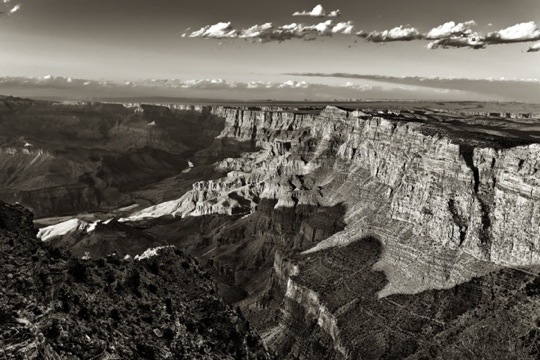
A few months ago, DPS published an article I wrote entitled “How to See in Black and White.” That article had a small bonus section at the end, in which I talked about how useful HDR can be to the monochrome photographer – a fact that is initially somewhat counterintuitive, since HDR is stereotypically held to be all about garish, over-done colors and excessive haloing.
In fact, as I talked about in that previous article, HDR can be extremely useful in bringing out microtexture, enhancing the effect of light and shadow, and in creatively influencing the overall tone of the image. All of these things lend themselves immediately and powerfully to black and white photographs, making HDR another viable tool in the monochrome photographer’s arsenal.
That section of the article received many comments and questions. In particular, a lot of photographers were wondering about the “right” way to make a black and white HDR, given that there are, in fact, numerous possible paths you can take through the editing process to achieve the end result. With this article I will show you how I do it – my ‘recommended’ way – and also address a few alternative methods. I encourage you to experiment and discover which method works best for you, artistically, creatively, and economically.
5 Things That Can Cause Confusion in Lightroom
Lightroom can be a confusing experience for many new users. This article from Pixiq may help to clarify things. It begins,
Lightroom has the joy of being simple to start with, but still having hidden depths. Sometimes this means we see things that can confuse new users when looking for solutions to problems. Sometimes these are in the form of homonyms, other times in how Lightroom works internally.
10 REASONS WHY GOOGLE+ IS BETTER FOR SOCIAL PHOTOGRAPHY THAN FLICKR

Thomas Hawk writes,
A few months back I wrote a post “Flickr is Dead.” When I wrote that post I didn’t mean dead literally, I just meant that the soul of social photo sharing was migrating away from Flickr over to Google+.
Over the past few months the tide has begun shifting even more. Photographers are moving in mass from Flickr to Google+ as their primary photo sharing network.
Just like the social crowd moved from Webshots and Fotolog to Flickr a number of years ago, the social photography crowd is now moving from Flickr to Google+.
There are a number of reasons why this is happening and in this post I’ll outline some of the key ones.
 Helderberg Photographic Society