Originally published in the March 2016 issue of the Helderberg Photographic Society newsletter.
Feedback
Danie responded about IrfanView; “My one cents worth of input …. be aware when using Irfanview that the colour profile of the image is ignored … so the image will end up with a different colour than the original.”
This is exactly why we recommend converting your images to the sRGB profile before sending them off for display or publishing them on the web. As the artists we have no control of how our images will be displayed and because sRGB is smaller profile it most closely fits to the way images are displayed by unmanaged devices and software.
As for IrfanView; newer versions now have support for managed colour and the same is true for newer versions of FastStone Image Viewer.
When is a photograph no longer a photograph?
Do you ever find yourself thinking “But that’s not a photograph” when an image is displayed in club competition or review? I know I have on more than one occasion. I might think “We are a photographic society and that is digital art, not a photograph; it has no business being displayed here” only to be surprised when the image scores relatively well. Clearly this is very subjective and not everyone has the same opinion, so I thought I’d look at this subject by “googling” for “when is a photograph no longer a photograph” but this didn’t provide as much on the subject as I’d hoped
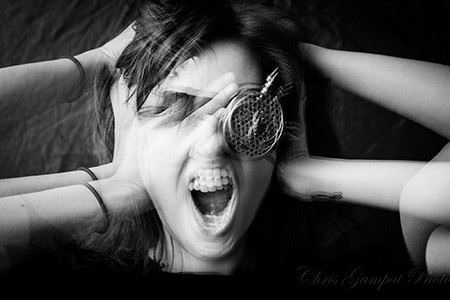
American photographer Chris Gampat begins a blog post on the subject thus;

Is the above image a photograph or is it something else? Is it digital art? Is it something created by someone who took loads of photos and layered them on top of one another?
Even so, does that mean that the image is no longer a photograph?
To create this image, what I did was a multiple exposure in camera. Asta was given instructions to do one pose, then another and then another. Using the Canon 5Ds, I layered each exposure on top of one another. The purists, who say that a photograph is a photograph as long as it just came out of the camera, would argue that this is indeed a photo. But if the images were not done in camera and layered on top of one another in Photoshop, they very much would not call the final image a photograph.
Read the article
So is it being made purely in camera that makes a photograph? I think that as club members we would disagree strongly with this as most of us use software to process our images, perhaps not adding or removing elements but altering exposure, sharpness, cropping and other properties, to achieve our vision of what we want the image to be.
Karen Alsop writes;
I’ve heard it said that digital composite art is not ‘Photography’. I’ve also heard it said that if it is digital art it is no longer a ‘photograph’. Both comments seem to anger digital photographic compositors. The purist photographers feel that any type of photoshop work negates authenticity. The ‘shoppers’ fight back and declare that even Ansel Adams dodged and burned in the darkroom.
Karen is a digital artist who produces images like this one;

And writes
Digital Photographic Art is not ‘a photograph’.
But I am still ‘a photographer’.
I am a photographer because I photograph each and every part of my composited image. I carefully assess light, perspective and colour and photograph each element with the purpose of seamlessly blending them together into a composite.
I am a photographer because I’ve used a camera to capture the elements for my composite. I’ve manually adjusted my settings for an optimal image, ensuring my aperture, shutter speed and ISO are set correctly for my purposes.
But… It is no longer ‘a photograph’
A composited image is a collection of photographs merged together. It is no longer simply ‘one capture’ but many captures carefully and masterfully blended together to create a piece of art. To call this simply ‘a photograph’ negates the painstaking hours photoshopping together every part to perfection.
Read more
There is an increasing tendency to proclaim “This image looks fantastic and it’s straight out of camera (SOOC)” as if this somehow means it is really a photograph, unlike another that has been processed with software. I have even said myself at club meetings after showing a black and white image that it was SOOC, but this doesn’t mean I think that makes it a better photograph image. Yes it’s great that my camera can produce usable images that require no further processing but that doesn’t stop me from using RAW + JPEG mode so I can get the black and white JPEG that may be usable as is, but I also get the RAW file that I can process extensively if I desire, and I often do. The ability of modern cameras to deliver very good ready to use JPEGs may be a boon to professionals shooting sports or events where they need to deliver images to clients as soon as possible, but it is not some badge of honour that has a real meaning otherwise. Here are some articles that expound on this.
As Goodrich says we should strive to get everything perfect in camera; not to produce a final image at a single click but to provide us with the best possible raw material for further processing. But I digress, SOOC is the other end of the spectrum from whether an image is a photograph or not. So let’s see what else we can find on that by changing our search terms to “digital art vs photography”.
This interview with Australian Fine Art Photographer and Digital Artist Alexia Sinclair doesn’t directly address the subject but presents some of Alexia’s photographs for Queensland Ballet that I think we would all agree are photographs, as well as some of her fantastic creations that while based on photographs, have transcended the realm of photography and become digital artworks.
The CNN article, Art photography: When ‘reality isn’t good enough’ talks to photographers and digital artists and presents 25 of their images. To me these blur the boundary between photography and digital art. There are images in there that the uninitiated might consider true photographs but that are actually skilfully created composites. Then there are images, like those from photographer Bryan Peterson that appear unreal and are seemingly created or at least considerably tweaked in software, but that are really single shots taken by manipulating light and environment when shooting the images. Still, I think that I would be comfortable with any of the images there being presented as photographs at our meetings.
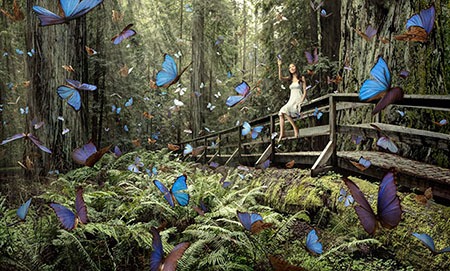
The article Photoshop in Photography: What Defines a Photograph? presents this image and shows how it was made.
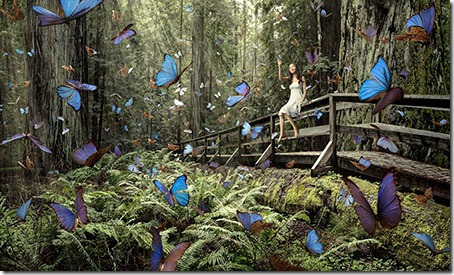
Photographer Chris Crisman entered the photograph, titled Butterfly Girl, into the World Photography Organisation’s 2012 World Photography Awards. It was selected from the thousands of entries as part of a promotional campaign for the contest and in that process was spread out all over the Internet.
Again, I would see that image as acceptable for club submission, yet it is clearly a composition made in software. So why is it that I’ve felt some clearly composited images submitted to the club were not suitable, yet I feel that some of the images discussed above were? I suppose it really comes down to personal preference. I conclude that if we like a particular composite image we are likely to consider it suitable for presentation as a photograph, while if we dislike a heavily manipulated image we are less likely to consider it suitable for presentation as a photograph.
As the club has no particular rules on what makes for an acceptable photograph we will just have to continue relying on the judging system to indicate suitability in terms of score. But I’d be interested to get some feedback on this from readers. Do you think that images being submitted to club evenings are all photographs, or do some cross the line?


 Helderberg Photographic Society