
This article looks at the state of RAW image capturing today as well as going over many of the available applications for processing RAW images. Read the article
Was That Photoshopped? It Doesn’t Matter!
At Digital Photography School, Rick Berk writes;
Often times when looking at an image, people will ask “Was that Photoshopped?” or “Did that scene REALLY look that way?” They say this as if the camera, left to its own devices, is going to display an unedited, “truthful” image. The truth is, that any image coming out of one of today’s digital cameras has been manipulated. The only question is how.
Updating your camera’s firmware
 One of our members asked how to do camera firmware upgrades.
First a caveat. Updating firmware carries a slight risk of malfunctioning that could render your camera inoperable. It is therefore widely accepted that you should only install a firmware update if it specifically corrects a problem you have or provides a new feature or performance increase you can benefit from. If your camera is working fine now then you may just want to skip updating the firmware.
There is no generic way to describe how to install firmware updates as this will differ from manufacturer to manufacturer and can even differ from device to device from the same manufacturer.
It is my experience (from using many electronic devices, which is what DSLRs are) that wherever a manufacturer provides firmware updates they will also provide explicit instructions on how to install them. It is very important to follow these instructions to the letter or risk "bricking" the device. If this happens you will at least need to have a service centre return the device to its factory default state, and there might be cases where a device needs to be returned to the factory to have this done. In isolated cases there might even be no way provided for the manufacturer to do this, meaning the device will permanently be nothing more than an expensive paper weight. However this is unlikely to be the case for digital cameras and usually affects cheap devices where manufacturers ignored this need to cut design and manufacturing costs.
If you think there may be a firmware update available for your camera here is what you should do.
Visit the support section of the manufacturer’s web site and look for a section that provides downloads. Once there you may find a list of available downloads to look through, or you may have to enter or select some choices to narrow down the camera you have.
As most of our members have either Canon or Nikon cameras, I have provided some specific info on this for these cameras. Bear in mind that these refer to web sites that may change in future, which could mean these no longer match what they are at the time of writing.
- Canon – select your country, product and model in the For you section and click the Go button. On the next page select the Firmware download type (click the circle so it gets a black dot in it) and a list of available firmware for your camera will be displayed. Find the latest update available for your camera, paying attention to whether there are different versions for Mac and Windows computers and click on it. You will now see a page with details of what has changed, a legal disclaimer and a button to accept and download the update. The download file is a ZIP archive that includes both the firmware update and instructions on how to install it.
- Nikon – page through the list to find the latest update available for your camera. Click on it and you are presented with a page explaining what features have been changed, how to verify which version you currently have, instructions for upgrading, a legal disclaimer and buttons to download the updates for either Mac or Windows computers.
If you feel uncomfortable with performing such an upgrade yourself you should approach a specialist camera store such as Orms who will be able to advise and possibly assist you. If they are unable to perform the upgrade for you they should be able to refer you to a service centre that can.
2012 November Competition Winners

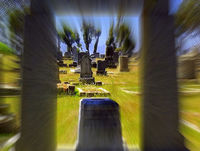
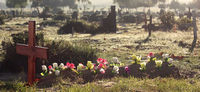
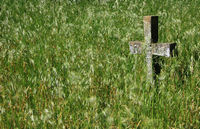
Here are the winning photographs from our November competition for which the set subject was Graveyards.
Set Subject – Projected
1
On the Other Side
Ronelle van Loggerenberg
2
Mourning Sun
Rachell Gemmell
3
So Many Deaths
Ronelle van Loggerenberg

Open – Projected
1
Dunes at First Light
Rosie Burton

2
Beauty in Devastation
Laurette van der Merwe

3
Golden Fields
Roger Lee

Set Subject – Prints
1
Babes in Heaven
Nettie Warncke

2
Graveyard Storm
Roger Lee

3
Crosswind
Rachel Gemmell
Open – Prints
1
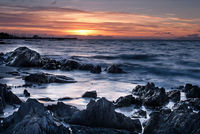
Jagged Sunset
Roger Lee
2
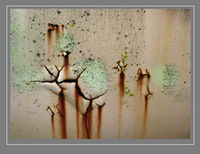
Rust in Chinese
Antenie Carstens
3
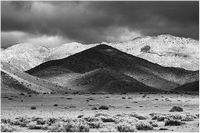
Light and Shade
Nettie Warncke
The full list of projected image scores can be found in this PDF document.
Should you be shooting RAW?
Elliot Hook writes on the Digital Photography School blog.
You can find many articles online discussing the benefits of shooting in RAW and probably an equal number full of counter arguments stating that it is possible to obtain equally good results shooting in JPEG. Whilst that is definitely true, I want to discuss the reasons that pushed me to exclusively use RAW in the hope that it can persuade others to do the same.
An interview with Thomas Hawk
 Thomas Hawk is a San Francisco-based photographer and popular photography blogger who has set himself the challenge of publishing one million photographs before he dies.
The Image Says it All
Fellow member Florian Breuer writes,
Hi All,
this is the first time I’ve ever been part of an exhibition: at the Old Biscuit Mill in Woodstock, Cape Town. The opening is next week Thursday. Unfortunately my name has been misspelled on the invite, but they promise to get it right everywhere else :)
You’re welcome to come and have a look.
Best regards,
Florian
Click the invitation image below to view at full size.

Your vote is needed
 Two of our members, Florian and Joshua, and perhaps others I’m unaware of are finalists in the Getaway Gallery 2012 competition. As the competition has now reached the voting stage please go and support our members and the other photographers by voting for the images you really like.
4 High Quality Photoshop Alternatives For Editing Your Photos
 On Photoshopgirl, Kelly Anne Wills writes,
While this site is heavily focused on Photoshop, there are some alternatives out there to explore if you can’t get your hands on a copy of the world’s top photo editing software, or maybe just want to try something different or less daunting. My friends have asked me several times in the past about what else they could use for common photo editing tasks without plunking down a small fortune for Photoshop, so today I’m going to list some other capable applications that can suit your needs. In addition to the products I have listed below, there are lots of very impressive online photo editors available that have been picking up popularity, so don’t hesitate to give those a try. It’s amazing how fully-featured some of them are!
Photographic Exhibition & Wine Fair
Several of our members are winners in the calendar competition mentioned in an email from Sue van Niekerk, who writes.
We are inviting you to our exhibition on Thursday 27th September 2012 at 18h00. Please see attached invitation. Entry is R30.00 and Calendars will be on sale at R120 per calendar. We look forward to seeing you at our exhibition.
The theme is Typically Stellenbosch. All the entrants of this amateur photographic competition will have works on the exhibition. The winners will be awarded their prizes at the opening of this wine tasting exhibition.
This calendar will make a lovely gift, so please support this great fundraising event. Our schools these days need much additional support!
You are welcome to invite friends and family.
If you would like to attend this event, the details can be found below.

 Helderberg Photographic Society